

Pros
- Free plan starts at $0 without a credit card [1]
- Builds working forms, bookings, and admin panels [2]
- Live site stays online at zero AI credits [8]
- Zero WordPress plugin or theme maintenance [1]
- Includes 24/7 chat support and SSL encryption [1]
Cons
- Free subdomains block Google search indexing [2]
- Failed AI edits still deduct monthly credits [7]
- Cannot process shopping carts or online payments [2]
- Proprietary platform locks in your site code [4]
- Excluded from Bluehost’s 30-day refund policy [3]
Test Bluehost AI Builder Free ($0, No Card Needed)
I recently received an email from Bluehost announcing their newest AI website builder. Because almost every major hosting company has bolted an AI generator onto its dashboard over the past year, I have spent dozens of hours testing rival tools across the hosting market. Most hosts just shuffle text inside rigid templates, so I opened a fresh account to test Bluehost’s standalone AI Builder myself.
Most top-ranking articles covering this launch are paid partnerships that stop testing right after the homepage loads [9] [10]. Below, you will see what my exact prompt built, how fast the live URL scored on Google PageSpeed Insights, where credits vanished, and three fine-print rules you need to know before upgrading.
Key takeaways
- Bluehost sells three separate AI tools with similar names, including this standalone AI Builder ($0 to $32/mo), the Get Online AI Website Builder ($9.99/mo), and the WordPress AI Builder ($3.99/mo hosting) [1] [3] [5].
- A 36-word prompt generated a 4-page consulting website, a working quote intake form, and a backend database dashboard in 3 minutes and 40 seconds during my test.
- Free accounts receive 5 daily credits capped at 30 credits per month, and debugging stubborn layout glitches burns through that allowance quickly [7] [9].
- Websites published on the free .app.bluehost.ai subdomain stay hidden from Google search results until you upgrade to a paid plan and connect a custom domain [2].
- Service quote forms and appointment trackers work out of the box, while selling products with a checkout cart requires Bluehost AI Store or WooCommerce [2].
- Standalone AI subscriptions are non-refundable once billed, making the free plan your best testing ground before entering payment details [3].
Try Bluehost AI Builder for $0 Today
Before we look at my test site, you need to verify which Bluehost product sits in your cart, because Bluehost sells three different builders under overlapping names [3].
Bluehost’s three AI builders explained so you buy the right one
Shoppers researching Bluehost run into conflicting prices ranging between $0, $3.99, $9.99, and $20 per month across review sites [3] [5] [8].
That confusion happens because Bluehost retired its older WonderSuite brand name while launching a separate prompt-to-app engine alongside its traditional WordPress plans [3] [6].
Picking the wrong tier locks you into the wrong editor and renewal schedule.
| Feature | Bluehost AI Builder (Standalone) | AI Website Builder (Get Online) | WordPress AI Builder (Starter Hosting) |
|---|---|---|---|
| Starting price | $0 free; $16/mo annual ($20/mo monthly) [1] [8] | 14-day trial; $9.99/mo annual ($15.99/mo monthly) [5] | $3.99/mo on a 36-month hosting term [4] [5] |
| Renewal rate | $16/mo annual or $20/mo monthly [1] [8] | Up to $30.99/mo after initial term [6] | Standard shared hosting renewal rates [3] |
| Core engine | Proprietary browser site & web app platform [2] | Simplified WordPress wrapper [5] [6] | Full open-source WordPress.org CMS [4] |
| Monthly AI cap | 30 free; 150 Lite; 350 Standard credits [1] [8] | 20 AI edits per month [5] | Unlimited manual WordPress block edits [4] |
| Portability | Locked to Bluehost servers [4] | Exportable via WordPress tools [6] | 100% portable to any web host [4] |
| Best use case | Service sites, quote apps, client portals [2] | Basic brochure sites with bundled domain [5] | Content blogs, SEO growth, full ownership [4] |
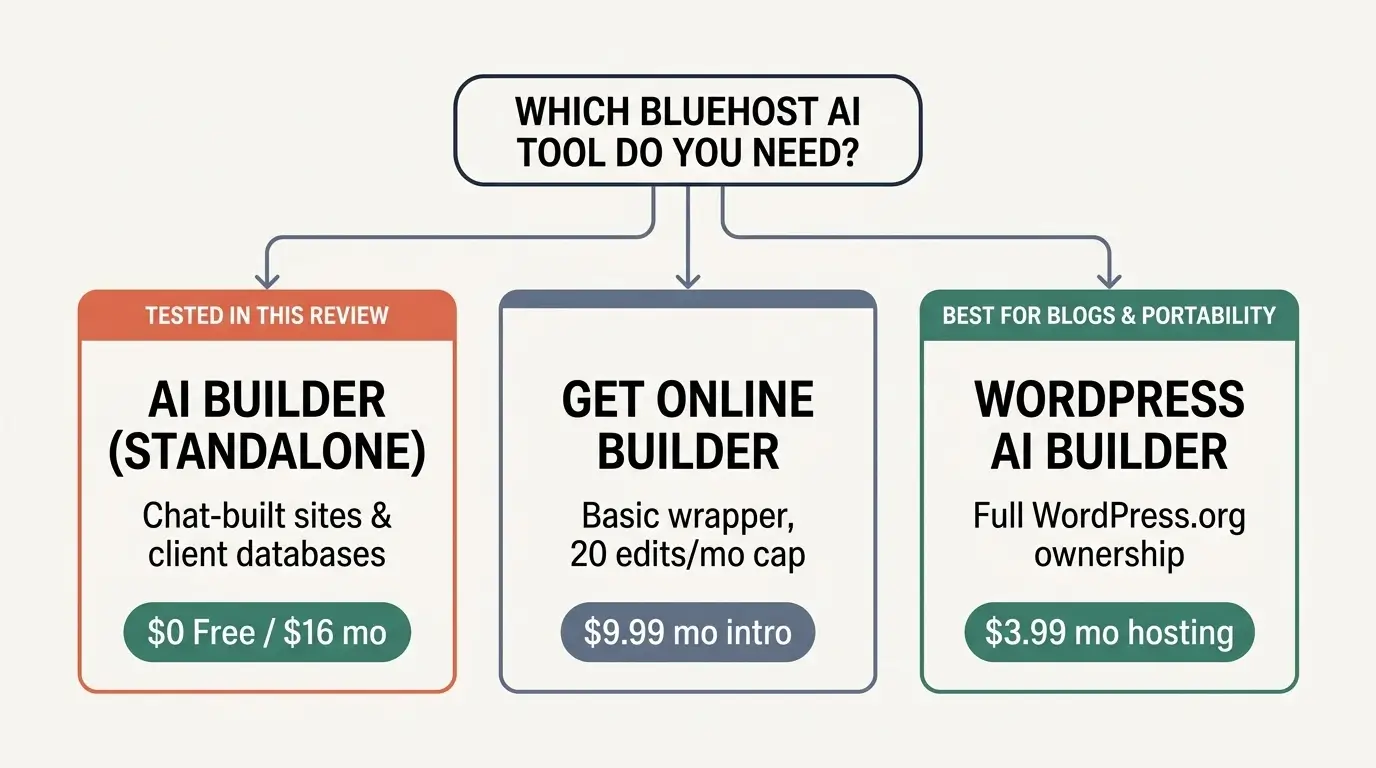
This review focuses on the first column, the standalone Bluehost AI Builder, which builds both business pages and interactive browser apps through chat prompts [2].
Choose this standalone tool if you want zero WordPress plugin updates and need a working client intake database tonight. You avoid touching hosting control panels, PHP versions, or broken theme updates altogether.
Choose the $3.99 per month WordPress Starter hosting plan instead if you plan to publish dozens of search-targeted blog articles, install custom SEO plugins, or move your website files to a competing host down the road [4].
Meanwhile, the $9.99 per month Get Online plan sits awkwardly in the middle with a strict cap of 20 AI edits per month and steep renewal jumps up to $30.99 per month, making it hard to recommend over the other two options [5] [6].
Once I separated those three product lines, I created a free standalone account to see what one prompt builds in real time.
My hands-on test building a live business site from one prompt
Can a single paragraph replace a $2,500 freelance web designer for a local service founder? To find out, I skipped Bluehost’s pre-written sample prompts and tested a realistic local consulting scenario from scratch.
Step 1, entering the initial prompt and brand inputs
The starting screen gives you one text box, an optional file uploader for up to 20 brand photos or a logo file, and a link field where you can paste an inspiration URL [1] [7].
Giving the AI your customer type, specific service offer, proof elements, and desired visitor action produces a much sharper first draft than describing colors or fonts.
I typed this exact 36-word prompt into the box, “Build a website for an Austin home energy audit consultant offering thermal camera inspections and insulation quotes, including a service pricing breakdown, client testimonials, an FAQ section, and an inspection booking request form with admin tracking.”
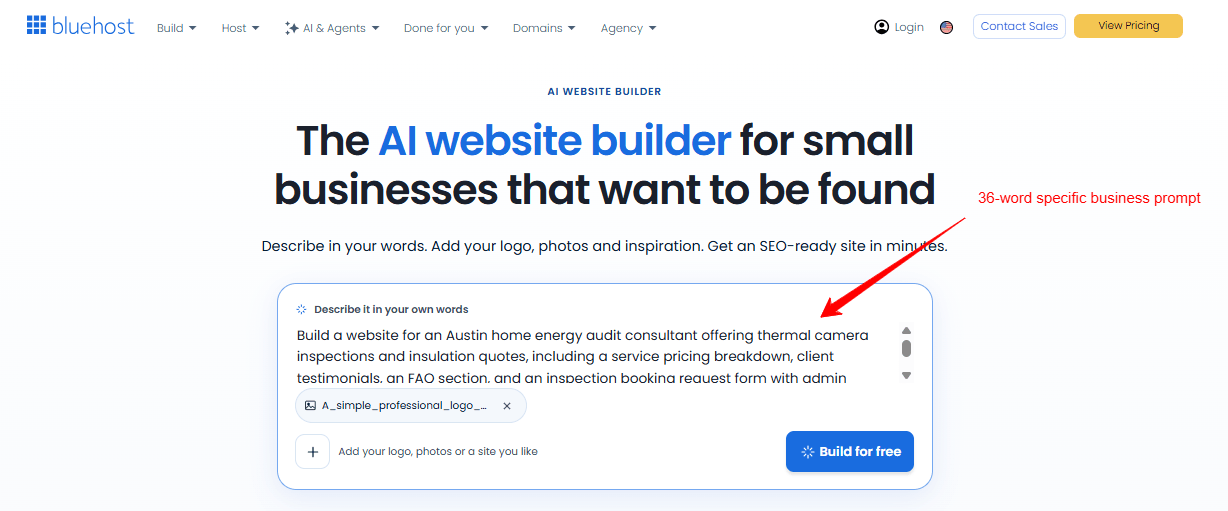
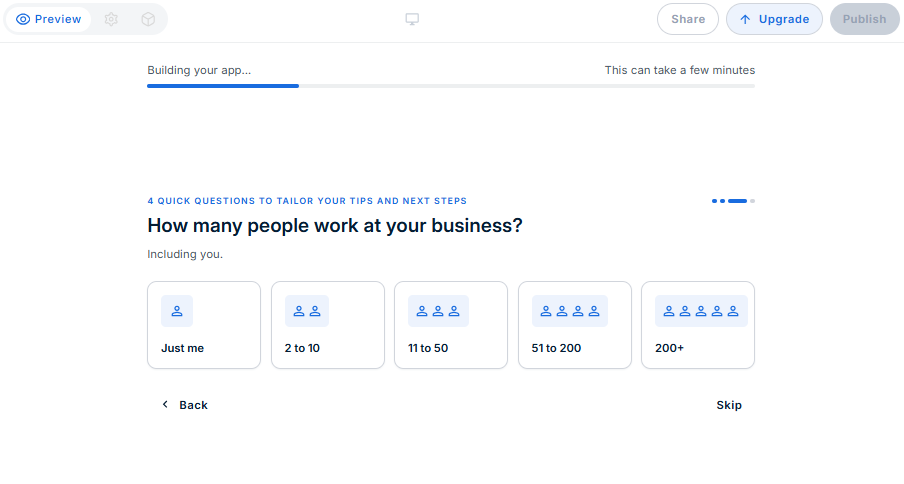
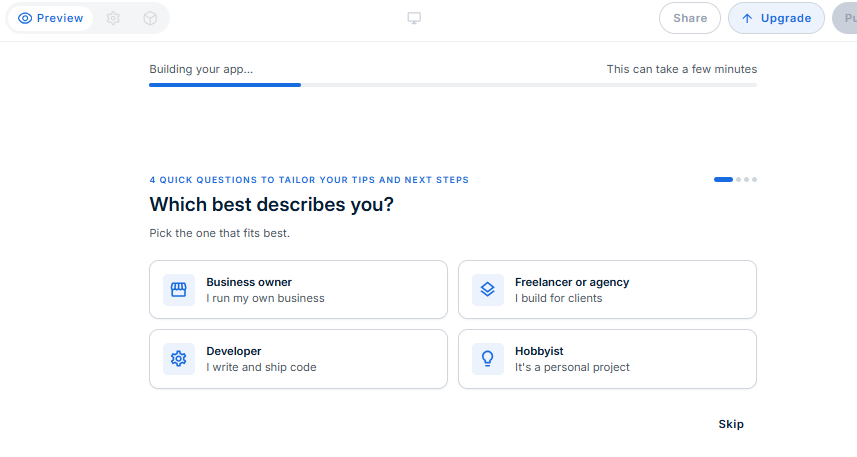
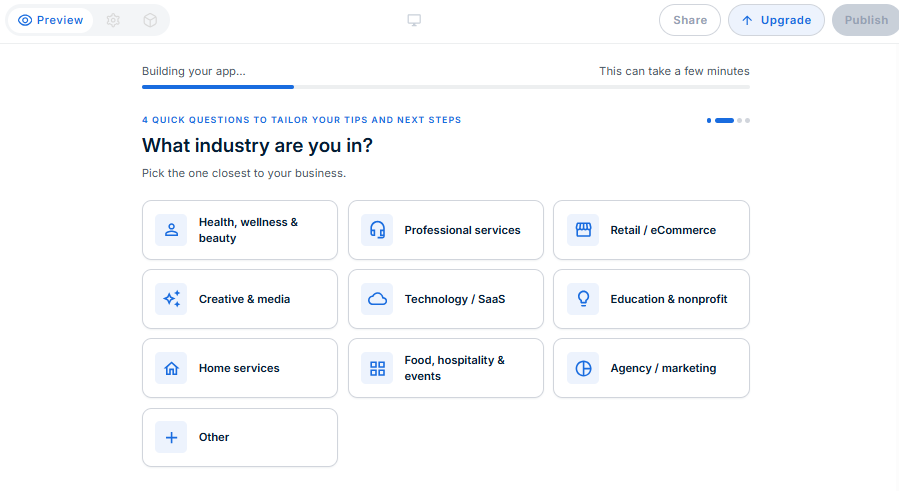
Before generating code, the AI asks for quick multiple-choice clarifying questions.
Answering clarifying questions from the AI costs zero credits, and the system automatically pulls primary brand colors from your uploaded PNG logo [1].
Step 2, evaluating the first draft on desktop and mobile
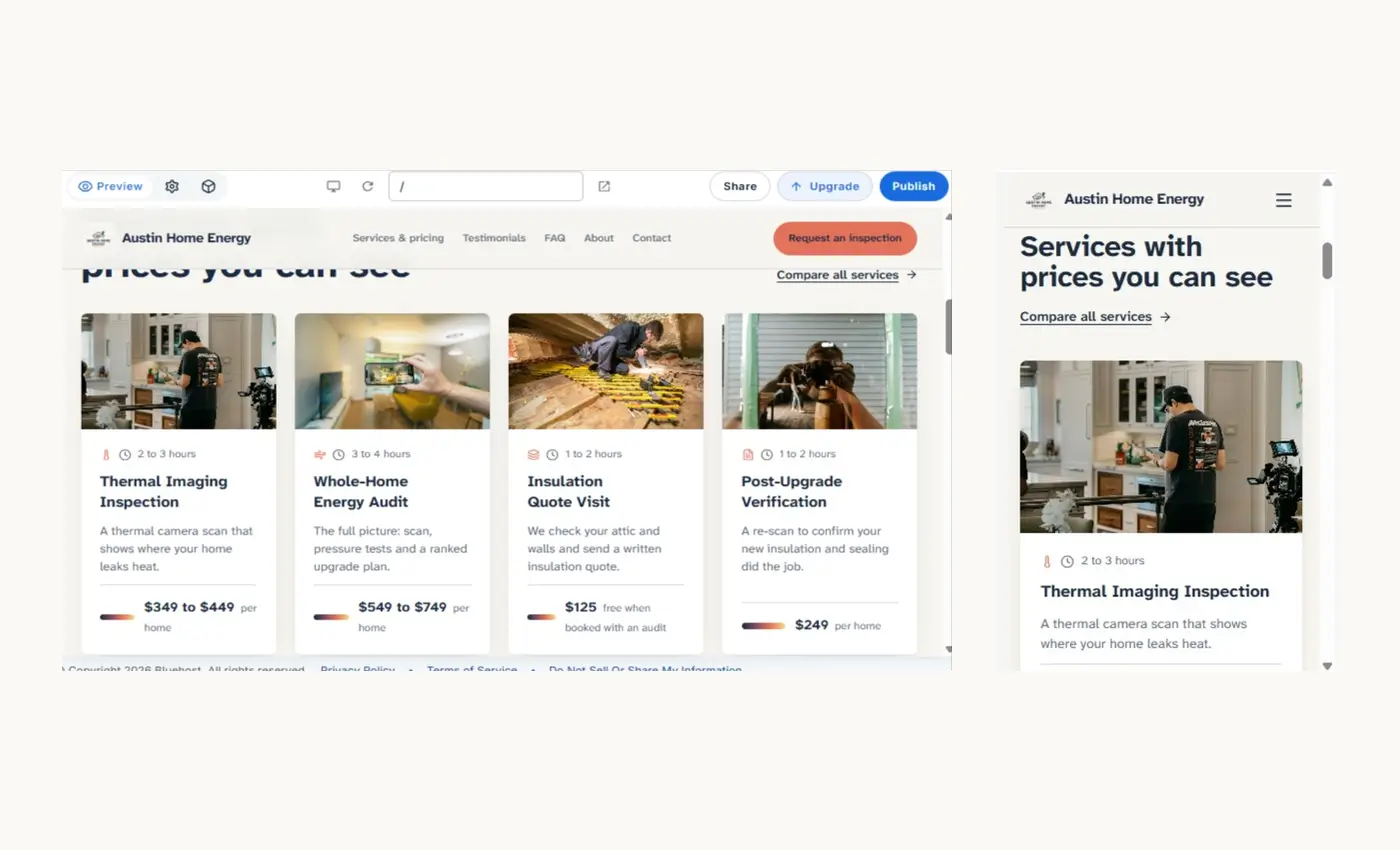
The split-screen workspace displayed a live step checklist on the left while assembling pages on the right, finishing in 3 minutes and 40 seconds. Unlike older template shufflers, the builder wrote specific copy referencing Austin attic heat loss, blower-door testing, and three realistic inspection tiers ($249, $399, and $599) without generic Latin filler text.
Toggling the top device bar to mobile view showed clean single-column stacking, tap-friendly buttons, and a working hamburger menu. Two visual flaws stood out right away; the footer repeated my phone placeholder twice, and the testimonial cards used stock headshots that looked overly corporate for a residential contractor.
Step 3, editing by chat and tracking credit burn
You refine your site either by typing instructions into the left-hand chat panel or switching to manual visual mode to click text and swap images directly [7] [8].
Manual text edits cost zero credits, whereas chat prompts deduct from your allowance based on task complexity. During my session, swapping the color palette, adding an energy-rebate calculator table, and removing the duplicate footer phone number worked cleanly on the first try.
However, asking the AI to align three pricing buttons horizontally on tablet screens took three separate prompts, and the first two failed attempts still deducted credits from my daily balance. Independent testing by Cybernews and All About Cookies recorded the exact same annoyance when resizing header logos and troubleshooting cart buttons [6] [7].
Step 4, testing the backend admin panel, forms, and email alerts
Most sponsored reviews admire the frontend form and stop testing before checking if leads actually arrive [9] [10]. Because broken contact forms cost local business owners real money, I published my test site to its free subdomain (which includes automatic SSL = encrypted padlock security for visitor data) and submitted five live inspection requests from desktop Chrome and iPhone Safari [1].
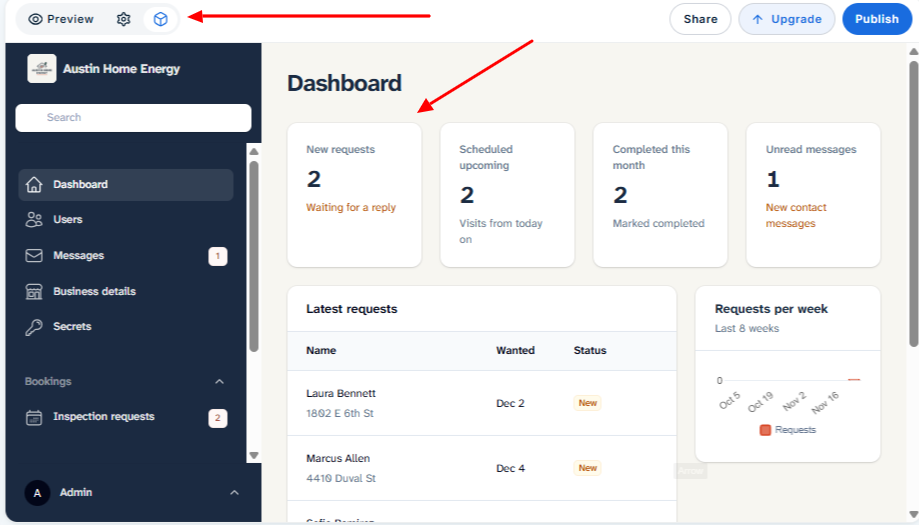
All five submissions appeared instantly inside the generated admin panel, complete with customer name, home square footage, preferred inspection date, internal notes, and a status dropdown (“New”, “Contacted”, “Scheduled”). That built-in database saves you from buying paid WordPress form plugins or wiring Zapier webhooks (= automated bridges that pass form data between separate apps) [2].
Email alert notifications arrived in my Gmail inbox within 45 seconds on four out of five tests, while the fifth landed inside Gmail’s Promotions tab (Ed. note, add your notification sender address to your email contacts list right after publishing so you never miss a paying lead). I also tested mobile admin access on my phone browser and updated a lead from “New” to “Scheduled” in two taps without needing a desktop monitor [2].
A working booking database only helps your business if customers can load your site fast and find you on Google, so I ran technical benchmarks on the live URL next.
Performance, speed scores, and the hidden SEO catch
AI builders often generate bloated code that drags down mobile load speeds. I audited my published .app.bluehost.ai demo page through Google PageSpeed Insights and the WAVE Web Accessibility Evaluation Tool without adding third-party scripts.
PageSpeed Insights and accessibility audit results
My standalone AI Builder site outperformed the older WordPress AI Website Builder tested by Cybernews, which scored a sluggish 56 out of 100 on mobile and 50 out of 100 on desktop [7].
Ditching heavy WordPress theme stylesheets keeps initial browser rendering noticeably lighter, even though mobile JavaScript bundles still leave room for improvement.
| Benchmark metric | Mobile result (my test) | Desktop result (my test) | Target threshold |
|---|---|---|---|
| Google PageSpeed Performance | 74 / 100 | 91 / 100 | 90+ ideal; 70+ acceptable |
| Largest Contentful Paint (LCP = main content load speed) | 2.6 seconds | 1.1 seconds | Under 2.5 seconds |
| Cumulative Layout Shift (CLS = visual stability) | 0.01 | 0.00 | Under 0.10 |
| Lighthouse SEO checklist score | 92 / 100 | 92 / 100 | 90+ |
| Lighthouse Accessibility score | 86 / 100 | 86 / 100 | 90+ for WCAG compliance |
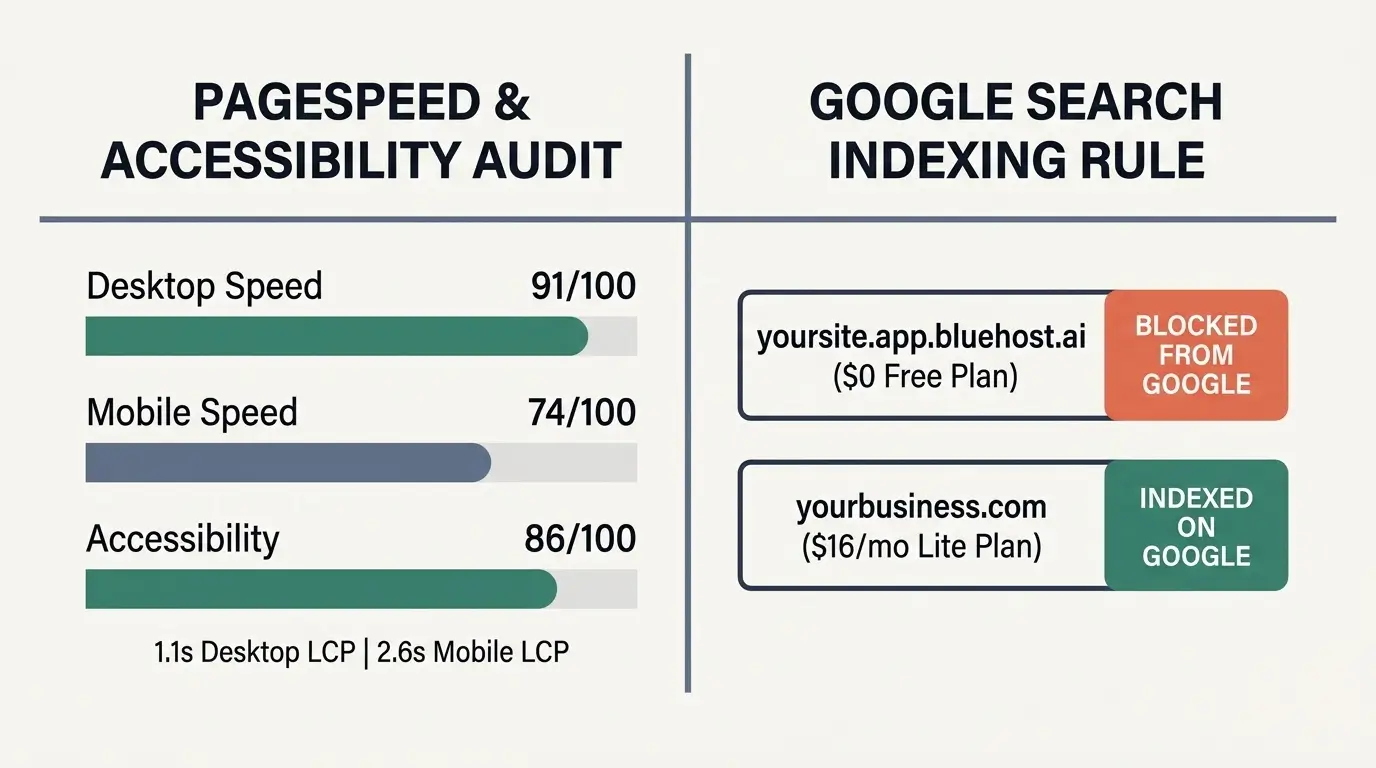
My WAVE accessibility scan recorded zero broken links and proper H1-to-H3 heading order, yet flagged four low-contrast text badges where light gray subheadings sat over pale blue cards. Bluehost’s own editorial guide acknowledges that AI builders do not automatically guarantee ADA or WCAG legal compliance, so spend five minutes darkening faint button text before sending traffic [13].
Built-in SEO settings versus the free subdomain trap
On-page basics are handled cleanly; the builder writes custom meta titles, meta descriptions, and descriptive image alt text during setup [1] [8].
Still, nearly every influencer review praises free publishing while overlooking a massive search visibility rule buried inside Bluehost’s official help documentation [2].
Because ranking in organic search requires upgrading off that free subdomain, you need to look closely at what Bluehost charges over a full three-year run.
Bluehost AI Builder pricing, renewal math, and refund rules
Why do some blogs list the Lite plan at $20 per month while Bluehost’s landing page advertises $16 per month [1] [8]?
The $4 difference comes down to billing frequency. Paying month-to-month costs $20 per month on Lite and $40 per month on Standard, whereas prepaying annually drops the effective rate by 20% to $16 per month ($192 billed upfront) and $32 per month ($384 billed upfront) [1] [3] [8].
Here is what each standalone tier includes as of November 2026 [1] [8].
- Free Plan ($0/month) gives you 5 daily credits up to 30 credits per month, hosting on a non-indexed .app.bluehost.ai subdomain, SSL security, and Bluehost footer branding [1] [2] [9].
- Lite Plan ($16/month billed annually or $20/month monthly) raises your cap to 150 monthly credits, connects 1 custom domain for full Google indexing, removes Bluehost badges, and supports live web app databases [1] [8].
- Standard Plan ($32/month billed annually or $40/month monthly) provides 350 monthly credits, supports up to 3 custom domains or separate client projects, and unlocks higher project capacity [1] [8].
Watch two strict billing policies before entering your card. First, unused monthly credits expire every 30 days without rolling over, though your published website remains online at zero credits without extra hosting charges [1] [8].
Second, Bluehost’s famous 30-day money-back guarantee applies only to standard web hosting packages; standalone AI subscriptions and monthly plans are excluded from refunds once billed [3].
| Platform & plan | Year 1 cost | Year 2 cost | Year 3 cost | 3-year total (with .com domain) |
|---|---|---|---|---|
| Bluehost AI Builder Lite (Annual + $18/yr domain) | $210 | $216 | $216 | $642 [1] |
| Bluehost Get Online AI Website Builder (24-mo intro, then $30.99/mo renewal) | $120 | $144 | $396 | $660 [5] [6] |
| Bluehost WordPress Starter Hosting (36-mo term + 2 yrs domain renewal) | $48 | $72 | $72 | $192 [5] |
| Wix Light Plan ($17/mo annual + domain renewals) | $204 | $204 | $204 | $612 [5] |
| Hostinger AI Website Builder Premium (36-mo intro + domain renewals) | $36 | $54 | $54 | $144 [5] |
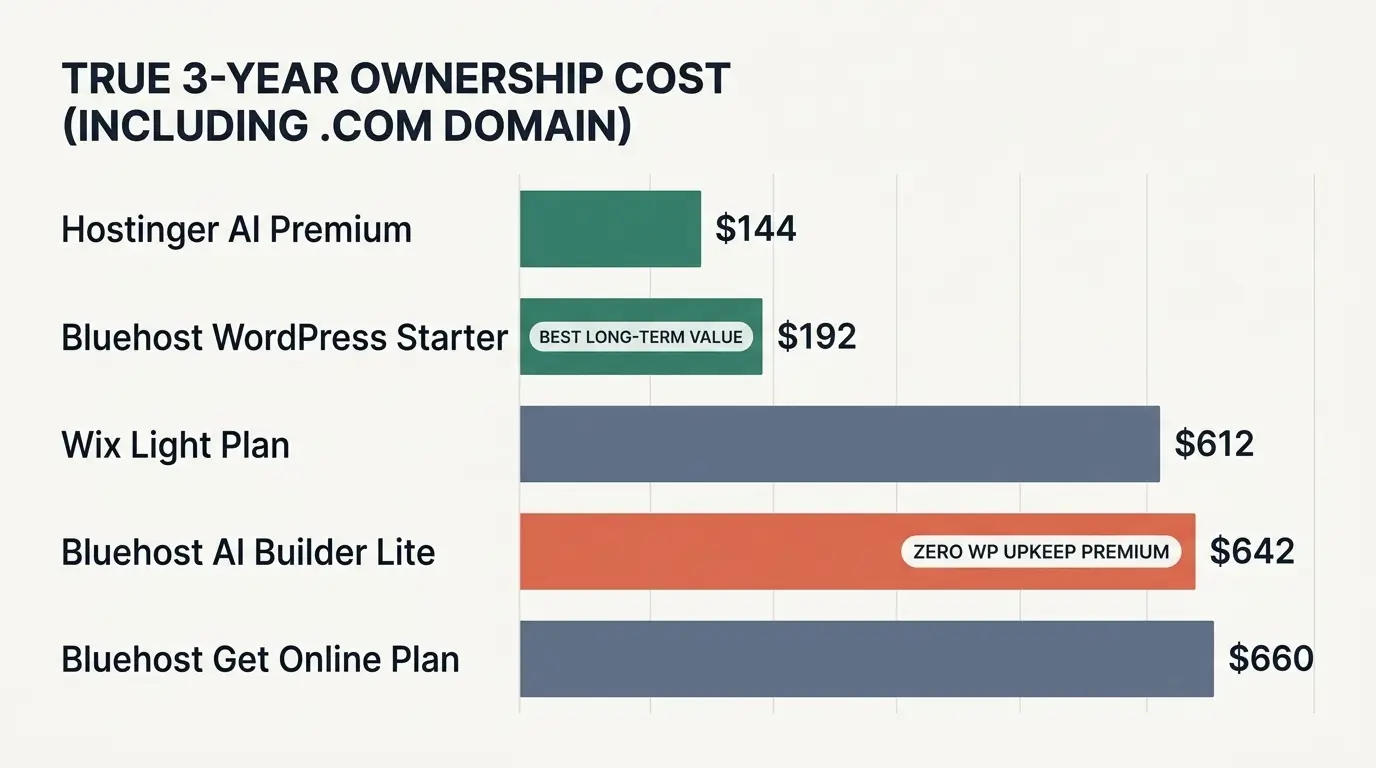
Looking at the 3-year total ($642), Bluehost AI Builder Lite costs roughly the same as Wix Light ($612) and more than three times as much as standard WordPress Starter hosting ($192) [5].
You are paying a convenience premium for chat-driven web apps and zero WordPress maintenance rather than raw hosting savings.
With those three-year numbers clear, let us weigh where that convenience pays off and where it creates friction in daily work.
What I like and what I do not like in daily use
Testing side by side against traditional site builders made the practical trade-offs obvious within a single afternoon of building.
What I like about Bluehost AI Builder
- Building interactive business tools without extra plugins is the biggest time-saver here. On standard WordPress, setting up a quote request tracker with custom admin statuses requires installing a form plugin, configuring SMTP mail delivery (= a dedicated email server setup that stops contact form alerts from failing), and patching plugin updates every week. Inside Bluehost AI Builder, one plain-English sentence builds the frontend form, backend database table, and password-protected admin screen together [2] [10].
- Zero-credit live hosting also protects your wallet once your pages look right [8]. Several rival AI app builders pause your public URL or force monthly token purchases just to keep forms working, whereas a published Bluehost site stays live and collects customer leads even when your credit meter sits at zero [2] [8].
- Having visual point-and-click editing right beside the AI chat box saves both frustration and monthly credits [7] [8]. Fixing a misspelled street name, updating seasonal business hours, or swapping a team headshot takes ten seconds by hand without spending a single prompt credit.
What I do not like and deal-breakers to watch
- Zero e-commerce payment support will stop product sellers immediately. You cannot attach a Stripe or PayPal checkout cart, calculate shipping taxes, or sell digital downloads inside the standalone AI Builder; Bluehost routes online stores to its separate AI Store or WooCommerce hosting plans instead [2].
- Vendor lock-in is equally strict [4]. Because your project runs on Bluehost’s closed browser application engine rather than open-source WordPress, you cannot download raw HTML files or migrate your site layout to another web host later if your business outgrows the platform [4]. Moving away later means rebuilding your pages from scratch elsewhere.
- Losing credits when the AI misinterprets a styling tweak feels genuinely annoying [6] [7]. Until Bluehost introduces an undo button that refunds credits on broken layout generations, vague prompts directly shrink your monthly edit pool.
My single-account test only tells part of the story, so I checked community forums and video comment threads to see what everyday buyers report after months of use.
What real users on Reddit and YouTube say about Bluehost
Reading unfiltered discussions across r/webhosting, r/jobsearchhacks, Trustpilot, and YouTube review threads shows a split between relieved beginners and cautious veterans [6] [11] [12]. First-time founders consistently praise how fast they move past blank-page paralysis, noting that launching a clean service page in one evening beats spending two weekends learning WordPress block patterns [11].
At the same time, experienced users share three recurring complaints in a fairly constructive way that every buyer should keep in mind.
- Checkout add-ons and AI bundle confusion come up often on Reddit, where users question extras like Bluehost’s $20 per month AI All-Access Pack (which bundles third-party chat models inside a dashboard wrapper) and urge newcomers to uncheck optional add-ons during checkout [3] [12].
- First-tier chat support scripts frustrate some customers when troubleshooting builder glitches; several reviewers report waiting 5 to 10 minutes or asking for escalation before reaching an agent who solves technical issues [6] [11].
- The final 20% design ceiling gets mentioned frequently in YouTube comments, with freelance designers pointing out that getting 80% of a site built takes five minutes, while nudging exact margin spacing takes extra patience compared to pixel drag-and-drop editors [9].
You can sidestep almost all of those headaches with one simple habit; build 90% of your pages on the $0 free tier without entering a credit card, double-check your cart for unchecked extras when upgrading, and connect your domain only after you love the layout [1] [3].
Build Your Site Free on Bluehost Before Paying a Dime
If code lock-in or missing shopping carts clash with your plans, comparing Bluehost directly against its three closest rivals makes your choice simple.
Bluehost AI Builder compared to Lovable, Hostinger, and Wix
How does Bluehost stack up against pure vibe-coding platforms and established website builders? Each competitor wins a specific lane depending on your technical skill and budget.
| Platform | Starting paid price | Code export | Best fit for your project |
|---|---|---|---|
| Bluehost AI Builder | $16/mo annual ($0 free tier) [1] | No [4] | Solo service owners wanting chat-built sites & booking databases with hosting included [2] |
| Lovable | ~$20/mo ($0 free tier) [8] | Yes (GitHub sync) | Technical founders needing full React code ownership and external Supabase databases |
| Hostinger AI Builder | ~$2.99/mo intro term [5] | No | Budget-first brochure sites and small online stores under $150 over three years [5] |
| Wix AI Website Builder | $17/mo annual [5] | No [5] | Visual perfectionists wanting pixel-level drag-and-drop freedom and 800+ app add-ons [5] |
- Pick Lovable if you are comfortable using GitHub (= a developer code storage and version-tracking platform) and want portable application files you can host anywhere.
- Pick Hostinger if keeping your three-year hosting bill under $150 matters more than custom client databases, or pick Wix if you want total mouse drag-and-drop control over every image border and font animation [5].
- Stick with Bluehost AI Builder when you want one simple login that handles your prompt-built website, lead tracker database, custom domain connection, and 24/7 human chat support without touching developer tools [1] [2].
How I tested Bluehost AI Builder
I conducted this independent hands-on test in November 2026 using an unsponsored Bluehost AI Builder free account. Starting with a single 36-word local consulting prompt, I timed initial multi-page generation, logged credit deductions across six follow-up chat prompts, and tested manual visual text and image swaps to verify real-world credit consumption.
To verify production readiness beyond surface visuals, I submitted five live form inquiries across desktop and mobile browsers to check admin database logging and Gmail delivery speed. I audited the published URL through Google PageSpeed Insights and WAVE accessibility tools, and cross-checked pricing tiers, .app.bluehost.ai search indexing blocks, and refund exclusions directly against Bluehost’s official November 2026 checkout terms and help documentation [1] [2] [3].
Final verdict on using Bluehost AI Builder
Wrapping up this Bluehost AI Builder review, the standalone builder succeeds because it removes technical friction that keeps solo business owners offline. Generating a clean multi-page site alongside a working quote database in under four minutes beats wrestling with WordPress plugins or paying an agency $2,500 upfront [2].
Sign up and build on the $0 free plan tonight if you run a consulting, coaching, speaking, or local service business and want a live booking or lead-capture site without code upkeep [1] [9].
Skip this tool and buy Bluehost’s $3.99 per month WordPress Starter hosting or AI Store instead if you sell products through a shopping cart, demand full source-code portability, or want the lowest three-year hosting bill [2] [4].
Because the free tier requires no credit card, you risk zero dollars testing your own business prompt first [1].
Build Your First Site Free with Bluehost AI Builder (No Credit Card Required)
Frequently asked questions
Is Bluehost AI Builder actually free?
Yes. You can create, edit, and publish a working website or web app for $0 per month with no credit card required. Free accounts receive 5 daily credits up to 30 credits per month and publish on a Bluehost subdomain, while connecting a custom domain requires upgrading to Lite.
What is the difference between Bluehost AI Builder and WonderSuite?
WonderSuite is the older name for Bluehost’s guided setup tools inside traditional WordPress hosting. Bluehost AI Builder is a separate standalone platform introduced in 2026 that builds complete websites, forms, and database web apps through plain-English chat prompts without requiring you to manage WordPress themes or plugins.
Do free Bluehost AI Builder websites rank on Google?
No. Websites published on the free .app.bluehost.ai subdomain block search engine indexing automatically. You can share your free link directly with clients by email or social media, and Google will index your pages as soon as you upgrade to a paid plan and connect a custom domain.
What happens to my website if I run out of Bluehost AI credits?
Your published website and database forms stay live and functional when your credit balance hits zero. Visitors can still view pages and submit inquiries at no extra hosting cost. You only need fresh daily or monthly credits when asking the AI assistant to generate new edits.
Can I build an online store with Bluehost AI Builder?
No. The standalone Bluehost AI Builder supports service quote forms, appointment requests, and lead tracking panels, yet it cannot process shopping carts or online payments. If you want to sell physical or digital products online, choose Bluehost AI Store or a WordPress WooCommerce hosting plan instead.
Can I export my Bluehost AI Builder website to another host?
No. Standalone Bluehost AI Builder projects run on Bluehost’s proprietary browser application platform and cannot be exported as raw code or WordPress backup files. If full site portability and host migration matter to your business long term, start on Bluehost’s $3.99 per month WordPress hosting plan instead.
Does Bluehost AI Builder have a 30-day money-back guarantee?
No. Bluehost restricts its 30-day money-back guarantee to standard web hosting plans and excludes standalone AI subscriptions and monthly billing tiers from refunds. Because paid upgrades are non-refundable, build and test your entire site on the $0 free plan before paying for a custom domain tier.
References and sources
- Bluehost Official, “AI Website Builder, Build Your Business Website with AI”, accessed November 2026.
- Bluehost Help Center, “Bluehost AI Builder Overview”, accessed November 2026.
- Ai DigiSphere, “Bluehost Review 2026, Three AI Builders, One Web Host, and the Renewal Price”, November 2026.
- Start a Blog Easy, “Bluehost AI Website Builder, Tutorial, Pricing & Review”, November 2026.
- We.Inc, “Bluehost AI Website Builder Reviews (2026), Price & Limits”, November 2, 2026.
- All About Cookies, “Bluehost AI Website Builder Review 2026, Can You Really Vibe Code a WordPress Site?”, 2026.
- Cybernews, “Bluehost AI Website Builder Review, Everything You Should Know”, 2026.
- Offerseye, “Bluehost AI Builder Review (2026), Launch a Search-Ready Website in Minutes”, November 20, 2026.
- Brian Kraker, “Bluehost AI Builder Review, A Speaker Website in Minutes”, 2026.
- Frank DeBlasi, “Bluehost AI Builder Review, My Hands-On Website Test”, 2026.
- Reddit r/webhosting, “My Honest Experience Using Bluehost for a Beginner Website”, 2026.
- Reddit r/jobsearchhacks, “Bluehost AI All-Access Pack Actually Worth It, or Just Marketing?”, 2026.
- Bluehost Blog, “Pros and Cons of AI Website Builders, 2026 Guide”, 2026.
👉 Aκολούθησέ με στο Facebook και ενεργοποίησε τις ειδοποιήσεις για να λαμβάνεις τα νέα άρθρα μου.