

I wanted to jump on the YouTube cash making train myself (although a bit late), but creating video content is time-consuming and expensive and I really don’t have time for this. My schedule it damn busy with affiliate marketing tasks – I just don’t have time for adding 10 – 20 hours in my weekly schedule for creating video content.
AI video generators like HeyGen promise a solution, but do they deliver?
I used HeyGen’s Creator plan for 30 days (here’s proof 👇) to create real marketing and training videos. This is not a quick test; it’s a review based on real-world use.
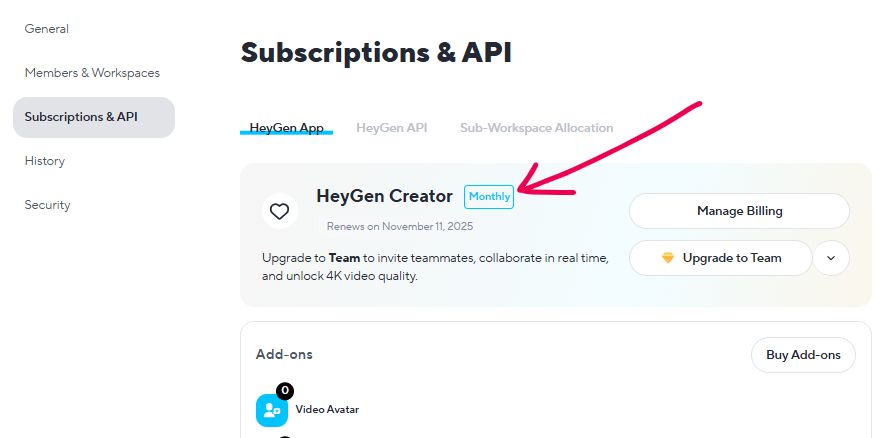
The verdict? HeyGen is impressively powerful for some tasks but has flaws that can be infuriating.
Here’s the full breakdown.
Key Takeaways
HeyGen Ai Video Generator Review

After 30 days of testing HeyGen and creating 55 videos, this AI video generator proves valuable for content creators and marketers. The platform excels with realistic AI avatars, quality voice cloning, and user-friendly video creation tools. While rendering times can be slow and occasional retakes are needed, HeyGen's Video Agent feature and cost-effective pricing make it practical for scaling content production. Best suited for explainer videos, marketing content, and social media. Minor limitations don't overshadow its time-saving benefits for consistent video output.
4.7
What is HeyGen?
HeyGen is an AI video creation and generation software.
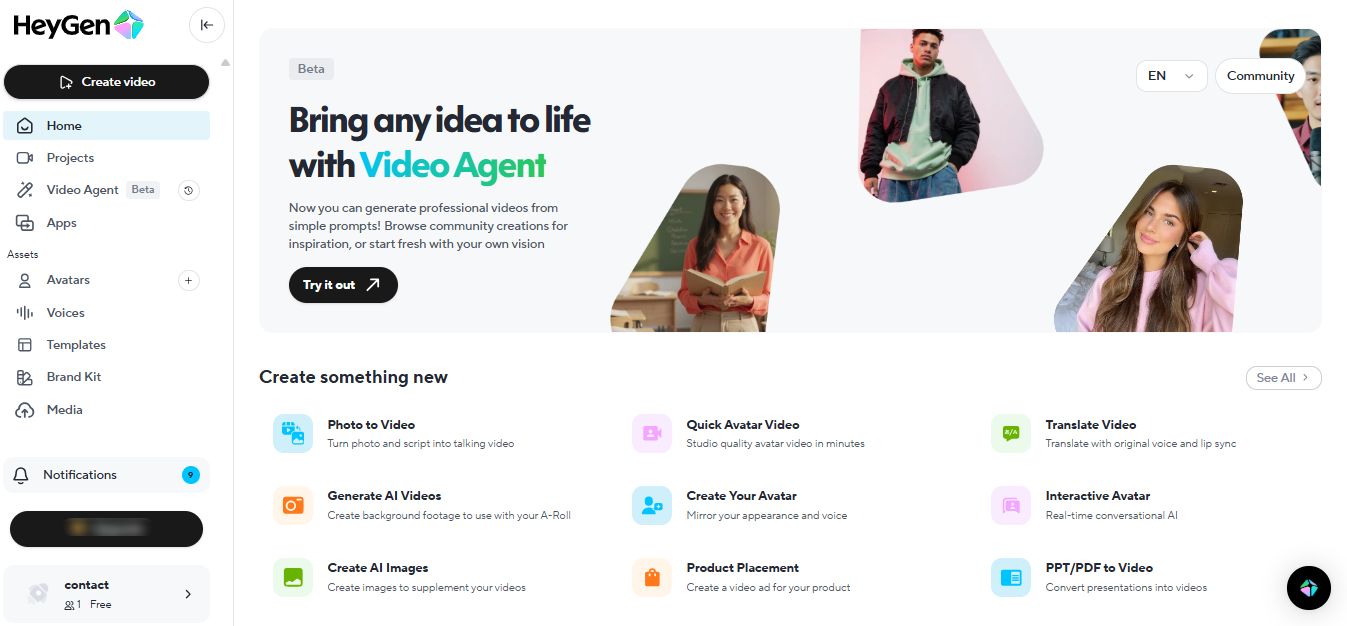
Creation means you build videos using AI-powered features like:
- Custom avatars (both stock and cloned from your face)
- AI voiceovers and voice cloning
- Automated lip-syncing
- Multi-language translation
Generation means you simply type a script and HeyGen produces the complete video for you. It doesn’t just slap stock footage together. The platform actually generates original video content and images using advanced AI models like Sora.
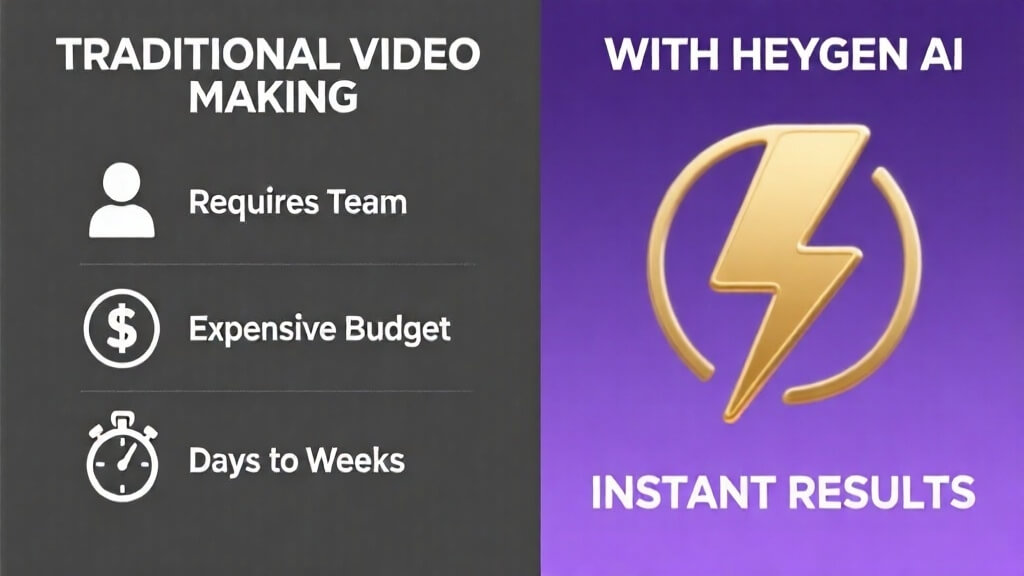
It’s purpose is to save you money and speed up video production.
Traditional video creation requires cameras, actors, studios, editors, and weeks of work. HeyGen eliminates most of that.
You type, click generate, and get a finished video in minutes.
It’s competing directly with platforms like Synthesia and Colossyan in the AI video space, but HeyGen’s standout features (especially video translation and voice cloning) set it apart.
My 30-Day HeyGen Test
I went into this test with specific questions that matter to anyone considering this tool:
- Is the video quality good enough for faceless YouTube channels and professional use?
- How realistic are the custom AI avatars and voice clones?
- Is the pricing straightforward, or are there hidden costs?
- How much time does it actually save?
- Is it buggy? What are the biggest frustrations?
My strategy with HeyGen is simple: create and upload dozens of YouTube Shorts weekly until I hit monetization.
That’s why mainly I used HeyGen’s Video Agent feature (more on that down the road).
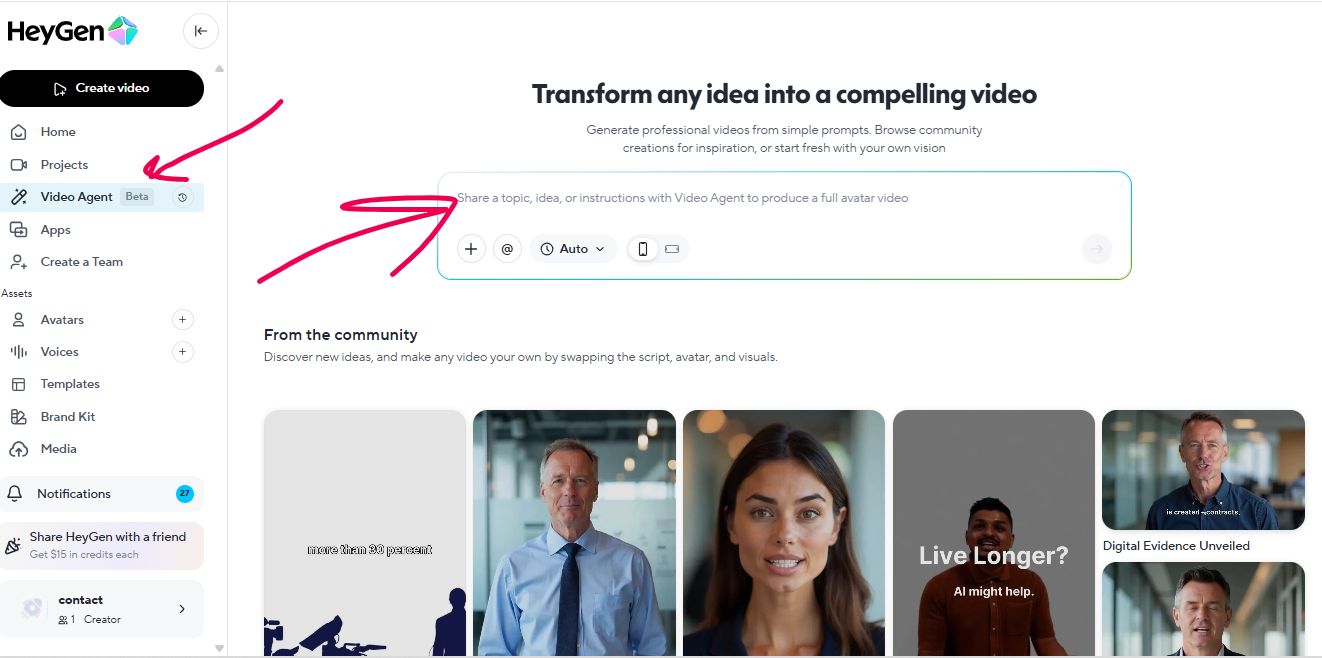
Nevertheless, I did create my digital clone, cloned my voice, and experimented with HeyGen’s templates to see what’s going on. More on that down the road.
HeyGen’s Core Features
In this section, I’ll talk about HeyGen’s CORE features. I will not do a deep analysis on all the features HeyGen has to offer. Here’s a quick table to start with:
| Feature | Rating | Assessment |
|---|---|---|
| AI Avatars | ⭐⭐⭐⭐☆ (4/5) | Stock avatars work well for functional content. Custom avatars look convincing on mobile but show AI characteristics under scrutiny. Avatar IV and VEO 3.1 integration significantly improved realism. Photo avatars transformed from “cheap parlor trick” to genuinely usable. |
| AI Voice & Voice Cloning | ⭐⭐⭐⭐½ (4.5/5) | Built-in voices are very good with 2000+ options. Voice cloning captures tone and pacing accurately. With ElevenLabs integration, audio quality becomes nearly indistinguishable from real human speech. Essential for professional content. |
| Video Translator | ⭐⭐⭐⭐⭐ (5/5) | Game-changing feature. Translates videos into multiple languages with automatic lip-sync adjustment. Quality sufficient for YouTube, social media, and professional training. Alone justifies subscription cost for global content creators. |
| Video Editor | ⭐⭐⭐☆☆ (3/5) | Browser-based interface is intuitive with minimal learning curve. Works well for simple projects. Frustrating bugs include corrupt file errors, inconsistent text alignment, unpredictable processing times, and occasional freezing. Needs workarounds. |
| Video Agent | ⭐⭐⭐⭐☆ (4/5) | Powerful automation tool that generates complete videos from prompts. Created 55 videos in one month. About 70% usable with minor tweaks. Inconsistent instruction following and quality variations. Excellent for volume, not perfection. |
1. AI Avatars
HeyGen provides four distinct avatar creation methods, each serving different needs and use cases.
Stock Avatars
HeyGen offers over 100+ pre-made avatars you can use immediately. The quality varies, but many look professional enough for corporate training videos and explainer content.
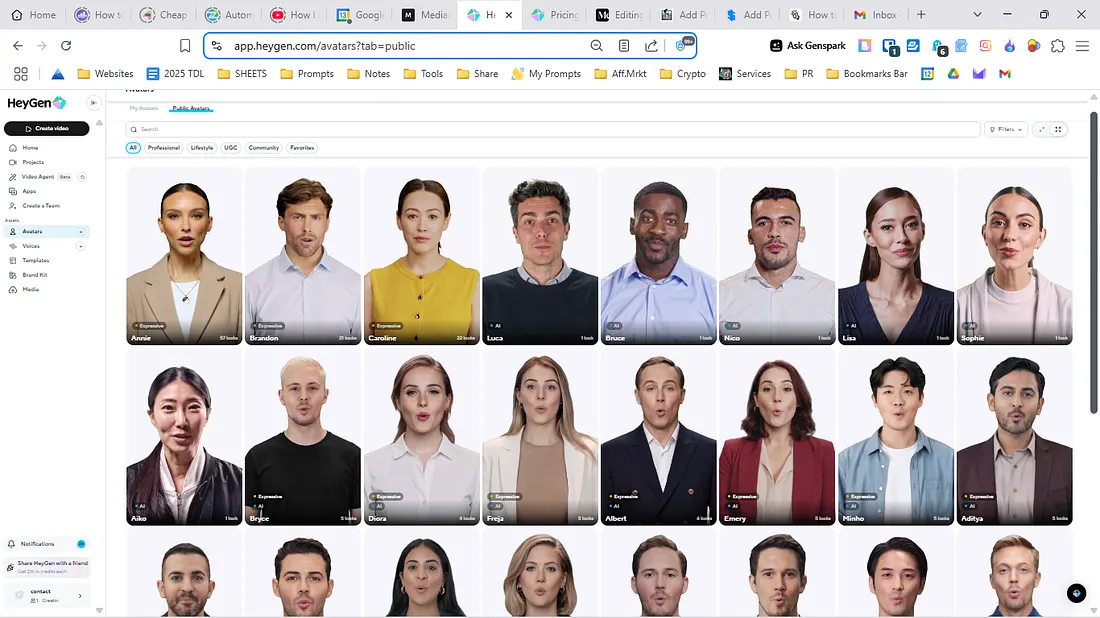
Some avatars look professional enough for corporate training videos or explainer content. They maintain decent eye contact, their movements feel somewhat natural, and the lip-sync is acceptable.
I found the business-casual avatars (people in plain shirts against neutral backgrounds) loos more “real”. The others look a bit stiff and robotic. The problem isn’t always the visual quality but the subtle movements.
An avatar might blink at odd times or have a weird head tilt that screams “AI-generated.”
Generative Avatars (Create from Text Prompts)
HeyGen lets you design custom avatars from scratch using text prompts alone – no camera, no photos required.
You simply describe what you want (“a professional CEO in a navy suit,” “a friendly teacher with glasses,” “an anime character with blue hair”), and HeyGen’s AI generates that avatar for you. You can customize expressions, outfits, poses, and backgrounds through natural language descriptions.
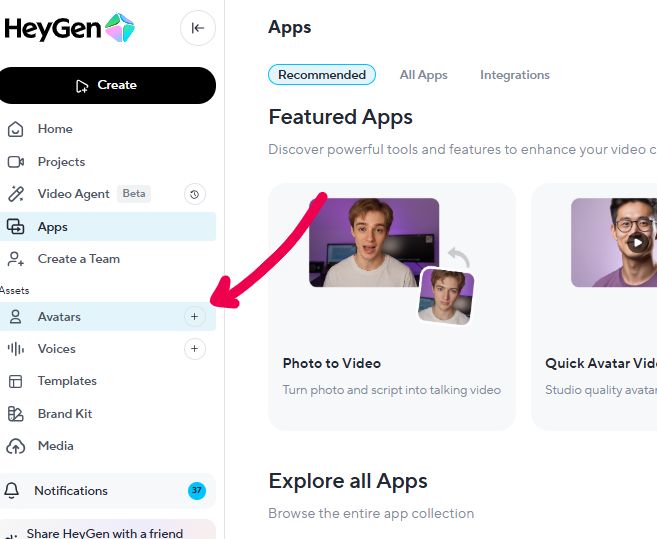
Here’s how easy it is. Just click on the plus sign on the Avatars tab.
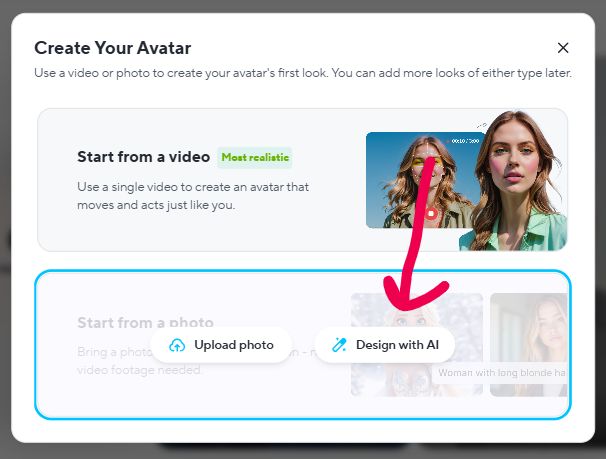
A new window will pop. Choose the start from photo and then the Design with Ai Option.
Then, you’ll be asked for writing your avatar’s prompt.
This opens creative possibilities beyond human limitations. Want a talking animal? A cartoon character? A fantasy persona? You can generate any avatar style and bring it to life with realistic speech and movement.
The system supports multiple styles including hyper-realistic humans, anime characters, and stylized designs. With proper prompting, you can create unique digital personas that don’t exist in reality.
Instant Avatar (My AI Clone)
This feature lets you create a custom avatar of yourself. You record a 2-minute video of yourself talking, upload it, and HeyGen processes it into an avatar that looks like you.
Here’s how to do it:
Major Update: HeyGen recently integrated Google’s VEO 3.1 technology, which significantly improves realism and video output quality. This wasn’t available during the original reviewer’s test period.
With VEO 3.1, HeyGen avatars now feature:
- Enhanced facial expressions and micro-movements
- Smoother, more natural motion
- Better emotional interpretation of scripts
- Improved consistency across multiple videos
The avatar captures your facial structure accurately. From mobile screens and standard viewing distances, it’s convincing. Voice consistency remains strong when paired with voice cloning, making your avatar sound authentically like you.
Close-up scrutiny still reveals AI characteristics. Eye movements don’t fully capture natural spontaneity, and lip-sync occasionally drifts with strong consonants. But for social media content, training videos, and most business applications, the quality is highly usable.
“Can I use this for client-facing content?” -you might think.
Well, that depends on your clients and your brand standards. For internal training or casual social media content, absolutely. For a polished brand video that represents your company on your homepage? I’d think twice.
Verdict: For internal training or casual social content, absolutely usable. The VEO 3.1 integration makes this significantly more realistic than earlier versions.
Photo Avatars
HeyGen also offers a “Talking Photo” feature where you upload a still image, and it animates it to speak your script.
The first time I tested this with a not that professional headshot – the result looked flat and unnatural.
The mouth moved, but the rest of the face stayed static. It felt like a cheap parlor trick rather than a professional tool.
But then HeyGen’s Avatar IV mode came out and when I re-tested things I saw a major difference in quality.
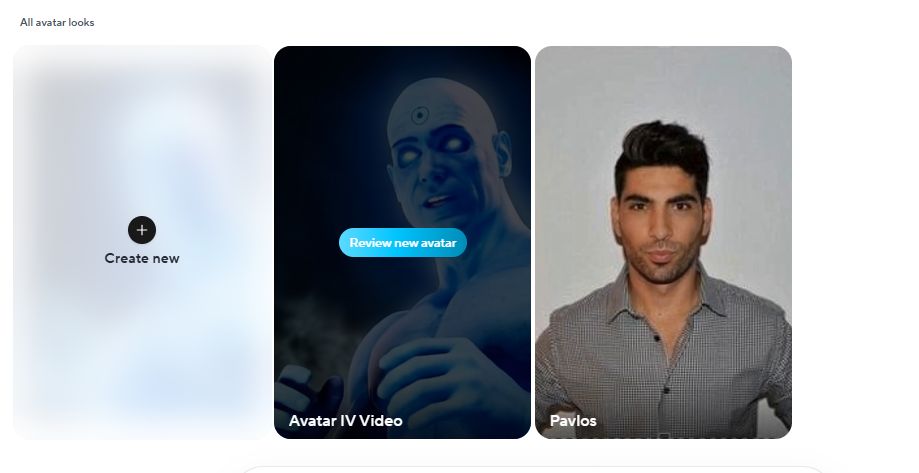
This next-generation model turns a single photo into fully animated, realistic talking videos with:
- Advanced lip-sync accuracy across 175+ languages
- Expressive facial movements that interpret vocal tone, rhythm, and emotion
- Natural hand gestures synchronized with speech for emphasis
- HD resolution options (720p or 1080p)
- Custom motion prompting (smile, nod, look surprised, etc.)
Avatar IV uses a diffusion-inspired audio-to-expression engine that analyzes your script’s emotional content. It generates photorealistic facial movements with natural timing – including head tilts, subtle pauses, and micro-expressions that feel genuinely human.
You can animate any image type: humans, pets, illustrations, anime characters, even cartoons. The model works with front-facing photos, profiles, and angled poses – not just static forward-facing shots.
Combined with VEO 3.1 integration, Photo Avatars now produce results that look remarkably realistic on mobile devices and standard screens. The “cheap parlor trick” critique no longer applies to Avatar IV-powered content.
➡️ Verdict on Avatars: Stock avatars = decent for quick, functional videos where polish isn’t the priority. Custom avatars = impressively close to realistic but not quite there yet. You’ll save time, but you won’t fool anyone who’s paying attention.
2. AI Voice & Voice Cloning
Stock Voices
HeyGen’s built-in text-to-speech voices are quite good. They have around 2000 different voices for every kind of needs and almost in every language on earth – even Greek. Female, male, kids, old, deep, sweet, robotic, extremely natural sounding, angry – whatever you need.
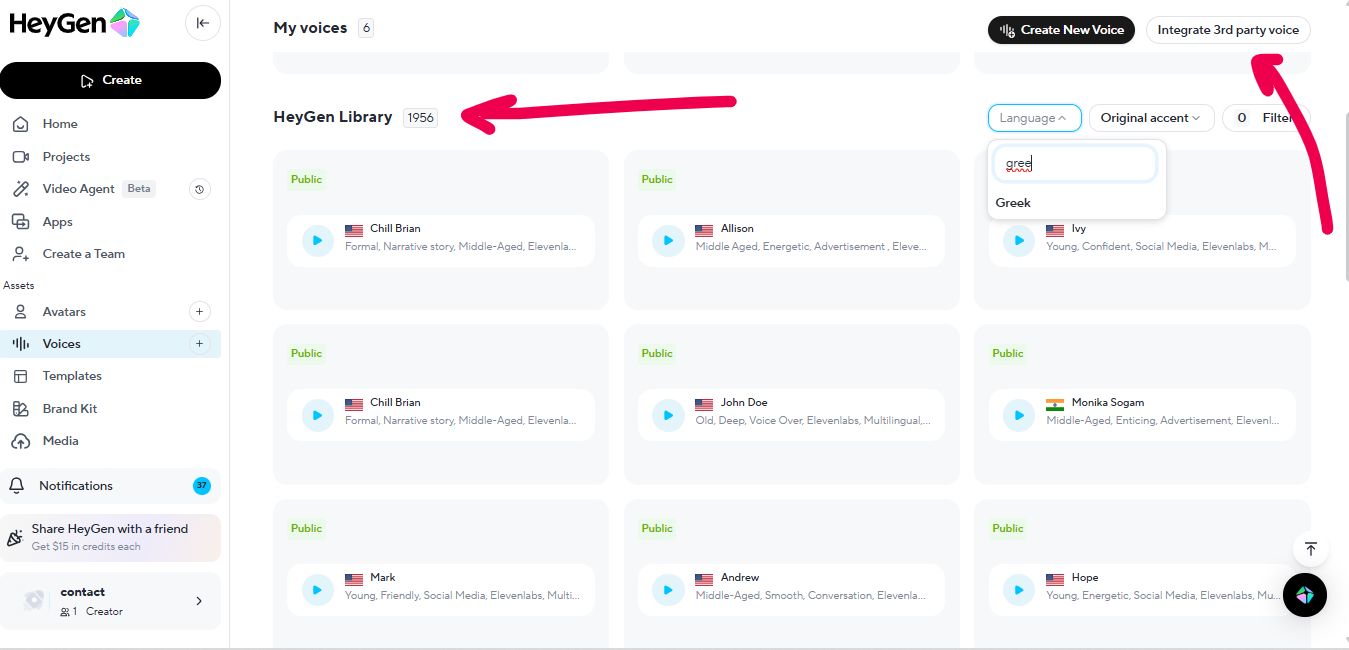
You can also integrate Eleven Labs and use their voiceovers as well. This requires an extra ElevenLabs account thought. I personally found their stock voices pretty good.
Voice Cloning
Voice cloning is where things get interesting.
I cloned my own voice by uploading about 2 minutes of clear audio. I basically recorded myself reading a kids book and then uploaded it to HeyGen.
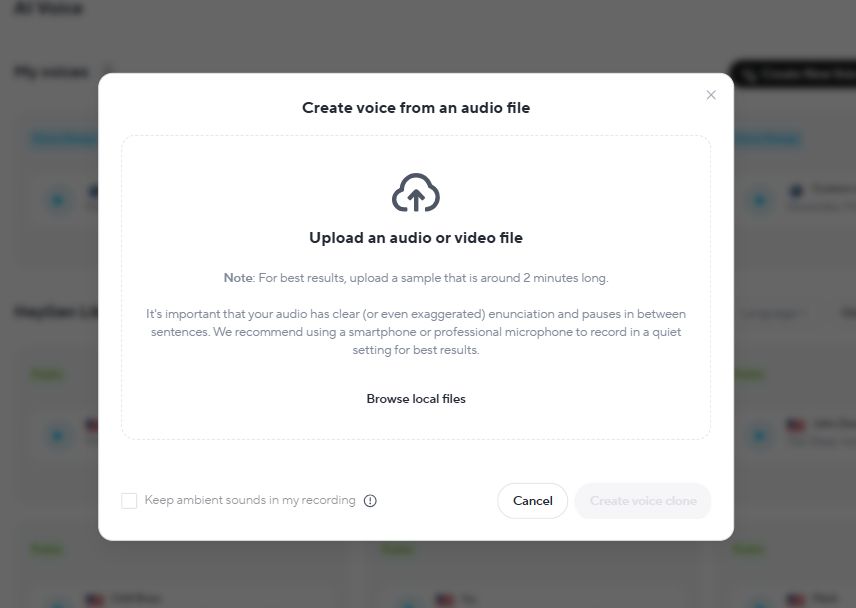
The system processed it in about 5 minutes or so.
The cloned voice sounds like me. My wife confirmed it. My friend confirmed it. It captures my tone, pacing, and even some of my verbal quirks.
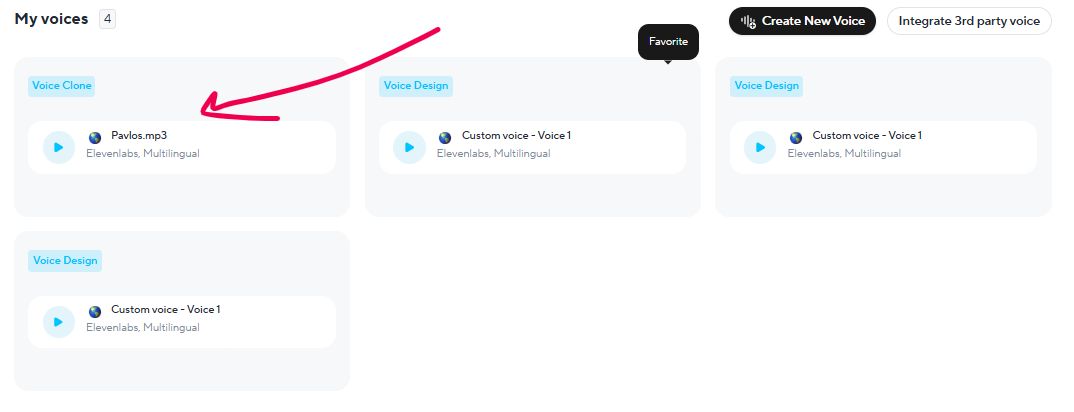
But – and this is a big but – it’s not perfect. Pronunciation occasionally stumbles on industry jargon or uncommon names. Emotional inflection is muted. If I’m naturally enthusiastic or sarcastic in real life, the clone delivers everything in a more neutral, even tone.
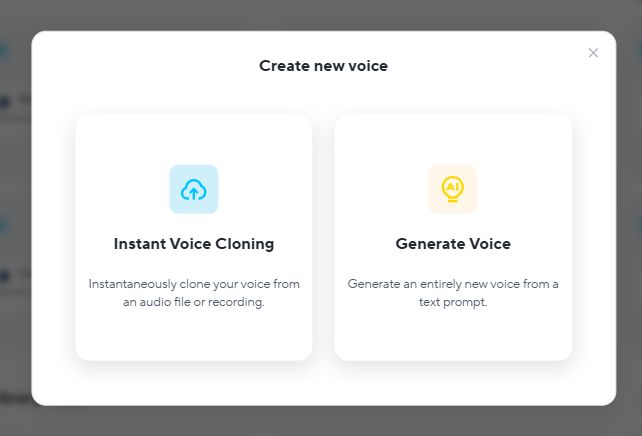
On thing that I need to mention is that you can generate your own voice by a text prompt. For example you can say something like “deep male voice, fast paced with frustration etc”.
The HeyGen + ElevenLabs Integration
This is where HeyGen’s voice capabilities go from “good enough” to “damn impressive.”
If you connect your ElevenLabs account – a third-party AI voice platform known for producing some of the most natural-sounding synthetic voices available – you can use ElevenLabs’ voices inside HeyGen.
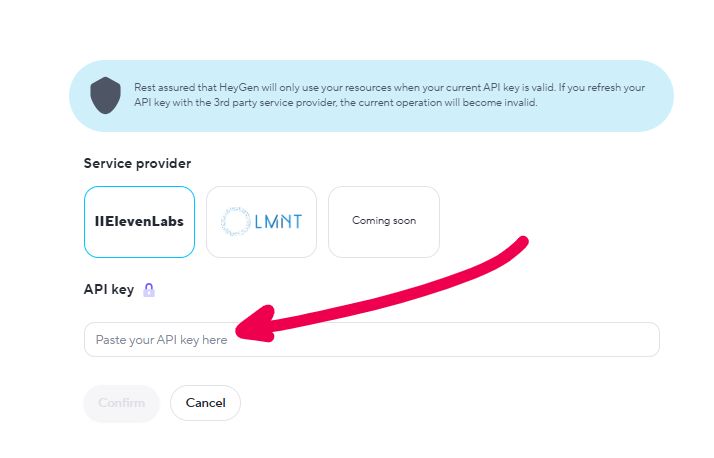
ElevenLabs is widely considered one of the best AI voice generators on the market.
I tried this, and the difference is night and day. The voices sound natural, emotionally expressive, and nearly indistinguishable from real human speech. If you’re serious about using HeyGen for client-facing content, this integration is non-negotiable.
The catch? ElevenLabs is a separate subscription. You’ll pay for HeyGen AND ElevenLabs.
➡️ Verdict on Voice: HeyGen’s built-in voices are very good. Voice cloning is solid for internal use. But if you want truly professional-grade audio, you need ElevenLabs. Consider that into your budget.
3. The Video Translator
This feature blew me away.
You upload a video of yourself (or any avatar) speaking in one language, and HeyGen translates it into another language while automatically adjusting the lip movements to match the new language.
Just check these unbelievable examples 👇
For content creators or businesses trying to reach global audiences, this feature alone might justify the subscription cost.
Traditionally, you’d need to reshoot videos in multiple languages or hire voice actors and editors. HeyGen does it in minutes.
The quality is good enough for YouTube, social media, and even professional training content. I wouldn’t use it for a high-budget ad campaign, but for 90% of use cases, it’s more than sufficient.
➡️ Verdict on Translation: This feature feels like the future. If you create content for international audiences, HeyGen is worth the price for this alone.
4. The AI Video Editor
HeyGen’s video editor is browser-based and visually similar to Pictory or other drag-and-drop tools. You work with a timeline, add text overlays, adjust backgrounds, and arrange scenes.
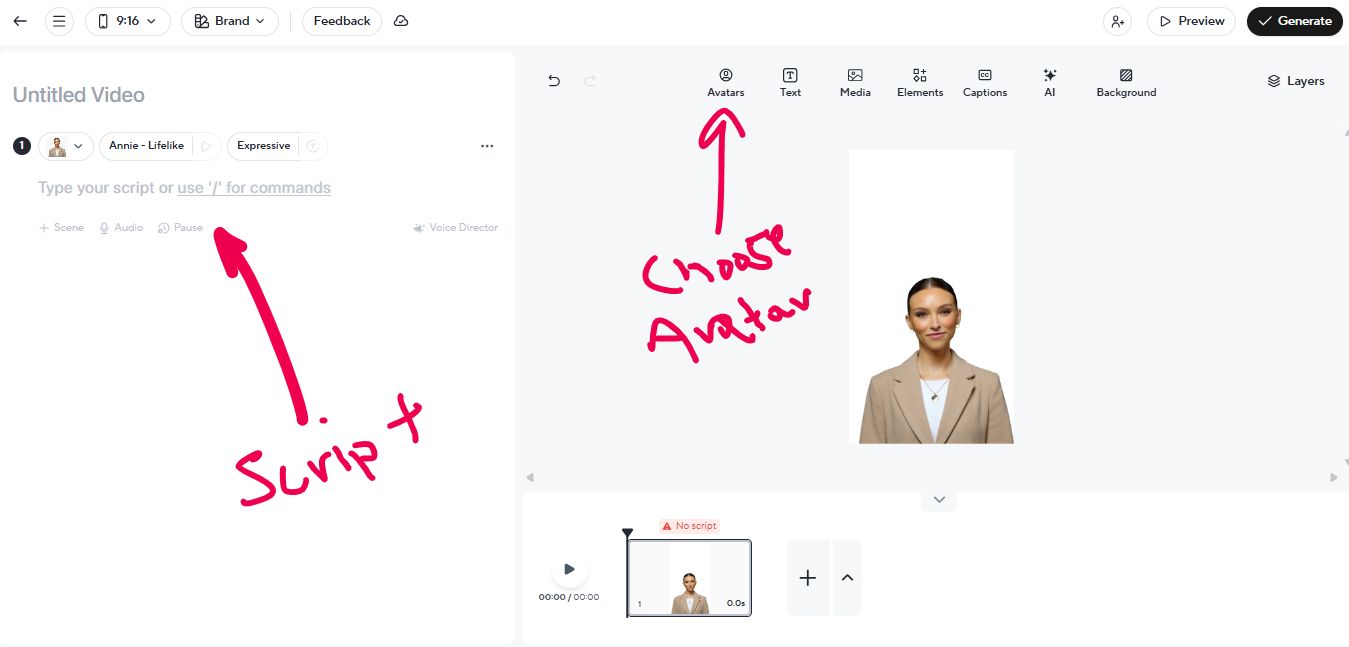
The learning curve is minimal. I was creating videos within 10 minutes of starting.
But the editor has quirks that range from annoying to genuinely frustrating.
The Process
- You start by typing or pasting your script.
- HeyGen breaks it into scenes automatically.
- You assign an avatar and voice to each scene.
- You can add text, images, and background music.
- Then you hit “Generate,” and the platform processes your video.
Simple videos (under 2 minutes, minimal edits) generate in 5-10 minutes. Longer or more complex videos can take 20-30 minutes or more.
Frustrations & Bugs
Here’s where my experience got rocky.
- Several times, I uploaded a background image, and HeyGen flagged it as “corrupt” even though the file opened fine in other programs. I had to convert the file format and re-upload. That added 10-15 minutes of frustration to projects that should have been quick.
- Text alignment is inconsistent. I’d place a text box in the center of the frame, generate the video, and the text would appear slightly off-center. I’d have to regenerate the entire video to fix it.
- Processing times are unpredictable. One day, a 90-second video took 8 minutes. The next day, a similar video took 25 minutes. There’s no explanation for the variance.
- The editor occasionally froze or failed to save my changes. I learned to duplicate my projects as backups, but that’s a workaround I shouldn’t need.
➡️ Verdict on the Editor: The interface is intuitive, and for simple projects, it’s fast. But the bugs and inconsistencies make it frustrating for anything complex. You’ll spend extra time troubleshooting issues that shouldn’t exist.
5. HeyGen Video Agent
This is the feature that convinced me to subscribe in the first place.
Video Agent is HeyGen’s AI-powered content generator that creates complete videos from a single prompt. You type what you want, hit generate, and it produces the entire thing: script, visuals, voiceover, transitions, everything.
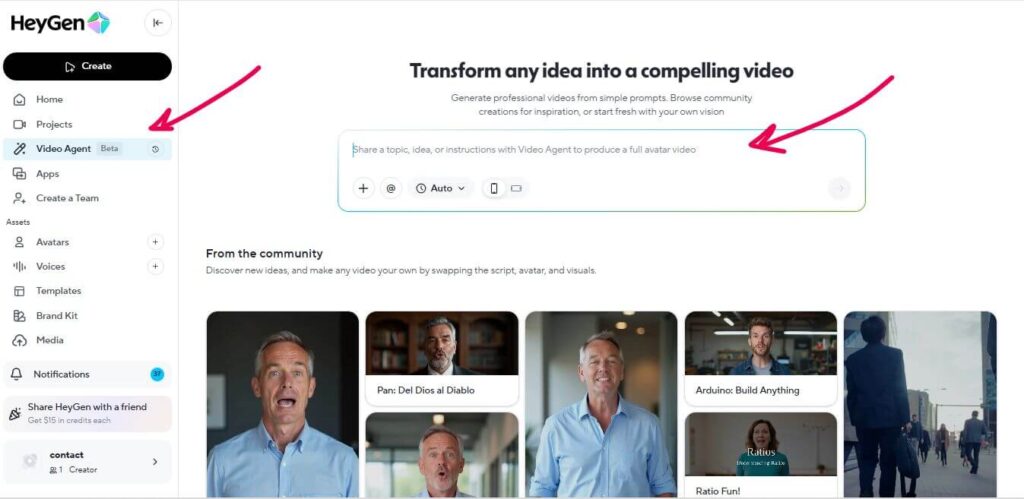
No manual editing. No timeline adjustments. No avatar selection. It does it all automatically.
How It Works
The process is simple:
- You type your prompt.
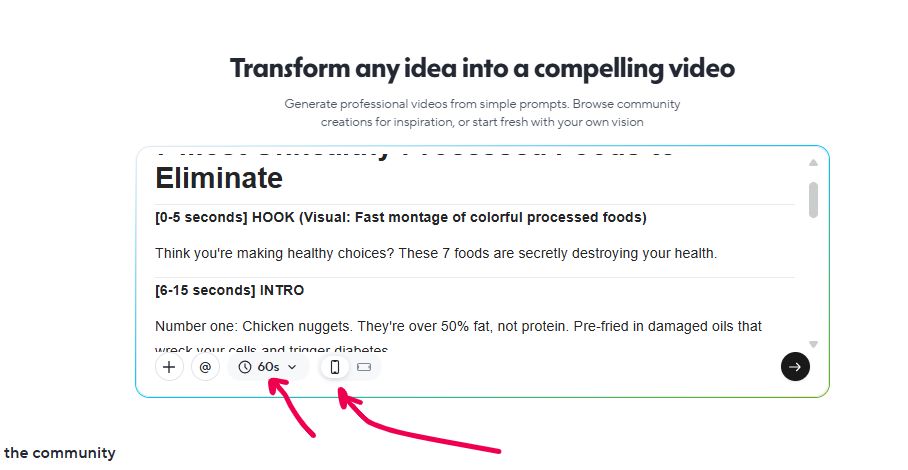
- Video Agent analyzes your request and writes the script, generates visuals, selects an avatar and voice, and assembles everything
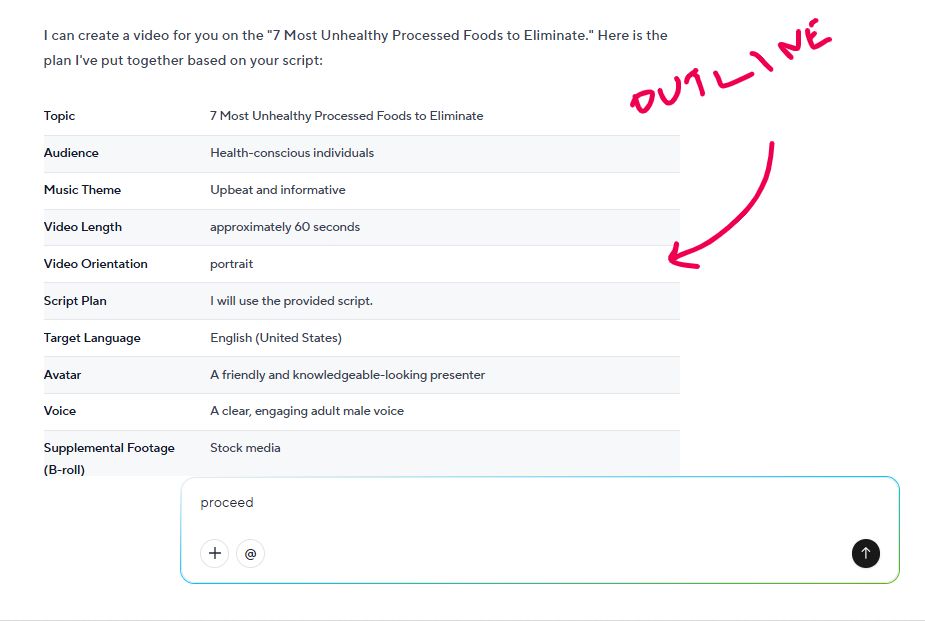
- You get a polished video in 5-10 minutes
NOTE: The system can generate videos up to 30 minutes long, though I stick to YouTube Shorts (under 60 seconds) for speed and credit efficiency.
My Experience
I use Video Agent to pump out dozens of YouTube Shorts. My goal is simple: create enough content to hit monetization requirements without spending hours filming and editing.
When it works, it’s brilliant. I type something like “Explain the 80/20 rule in business,” and 15 minutes later, I have a decent video with a professional-looking avatar, clear voiceover, and relevant on-screen text.
But here’s the frustrating part: Video Agent doesn’t always follow instructions precisely.
Sometimes I ask for a 45-second video, and it generates a 90-second one. Other times, I specify “use a female avatar,” and it picks a male one anyway. The quality varies wildly. Some videos look polished and ready to upload. Others have awkward pacing or scripts that feel AI-generated in the worst way.
I’d say about 7 out of 10 videos are usable with minor tweaks. The other 3 need complete regeneration.
The Biggest Advantage
Speed and volume.
I create 55 videos in one month. If I had filmed and edited those traditionally, it would have taken weeks of full-time work. Video Agent lets me batch-produce content at scale. For faceless YouTube channels or anyone who needs high volumes of simple explainer videos, this feature is a time-saver.
The Biggest Weakness
Lack of control and consistency.
You’re trusting the AI to interpret your prompt correctly. Sometimes it nails it. Sometimes it completely misses the mark. There’s no preview before generation, so if it gets it wrong, you’ve wasted 15-20 minutes and burned through credits.
➡️ Verdict on Video Agent: If you need to create dozens of simple, informative videos quickly and you’re okay with inconsistent results, Video Agent is a powerful tool. It won’t replace careful, manual video creation for high-stakes content, but for volume-based strategies, it’s bloody useful. Just budget extra time for redos and don’t expect perfection.
HeyGen Pricing
HeyGen’s pricing is actually pretty competitive for what you get. The platform packs serious AI firepower into affordable plans that beat most competitors on value.
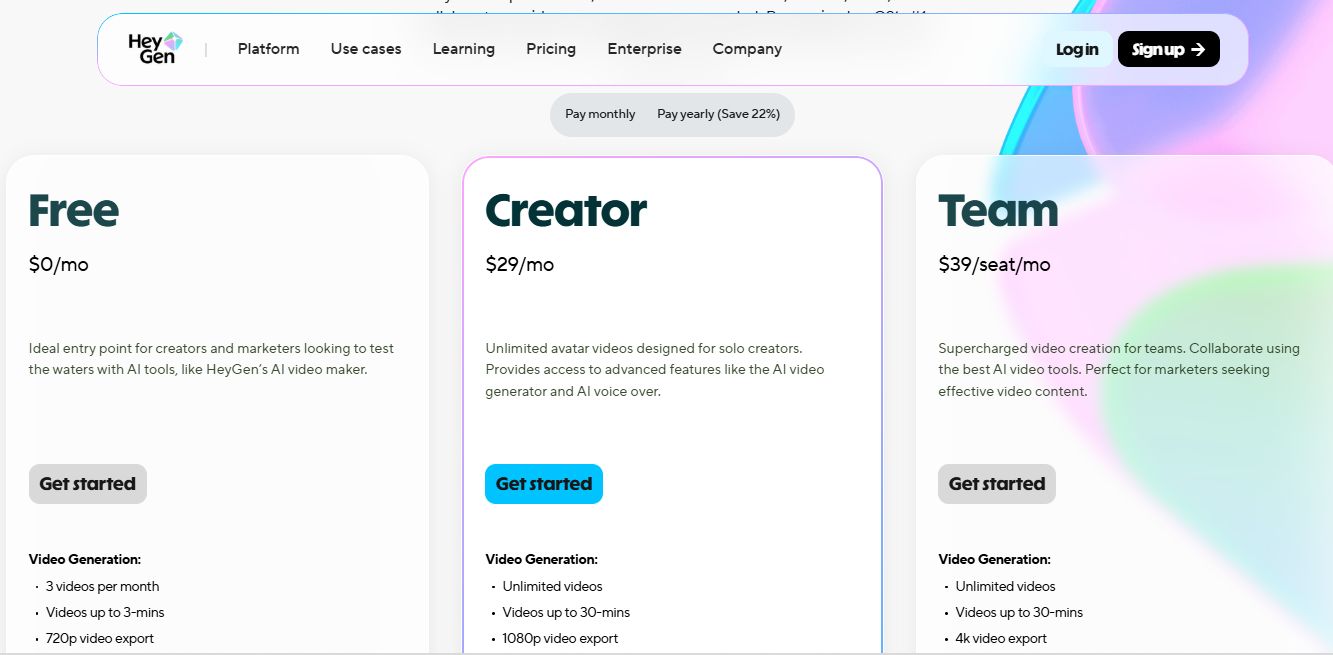
But there’s one thing that caught me off guard, and you need to understand it before you subscribe.
The “Unlimited Videos” Confusion
HeyGen advertises “unlimited video creation” on paid plans. This is technically true, but here’s what they mean:
Creation = The platform takes your script and assembles videos using stock footage, images, avatars, and voiceovers. You can do this unlimited times.
Generation = The platform uses advanced AI models (like Sora) to actually generate original video content from scratch. This consumes credits.
So yes, you can create unlimited videos using HeyGen’s templates, stock assets, and avatars. But if you want AI-generated visuals or premium features, you’ll burn through your monthly credits fast.
I didn’t realize this distinction at first. I thought “unlimited” meant I could generate as many AI videos as I wanted. Wrong.
Breakdown of the Plans
HeyGen offers three main tiers:
| Plan | Price | Credits/Month | Key Features | Best For |
|---|---|---|---|---|
| Free | $0 | 1 credit | 1-minute videos, 720p, watermarked, basic avatars | Testing the platform |
| Creator | $29/month (annual) or $39/month | 15 credits | Unlimited video creation, 1080p, no watermark, custom avatars, voice cloning, 5-minute video length | Solo creators, small businesses |
| Business | $120/month+ | 30+ credits | Everything in Creator plus priority processing, API access, team collaboration, longer videos | Agencies, larger teams |
I use the Creator Plan. For $29/month (billed annually), you get access to nearly every feature HeyGen offers. That’s impressive.
How Credits Work
Credits are HeyGen’s way of managing resource-intensive features. Here’s what consumes them:
- Video Agent generations: 1-3 credits depending on length
- AI-generated visuals: Uses credits based on complexity
- Priority processing: 1-2 credits for faster video rendering
- Premium avatars: Some stock avatars cost credits to use
- Instant Avatar creation: 3 credits to create your custom avatar
- Video translation: Credits based on video length
Standard video creation (using templates and stock assets) doesn’t consume credits. You can make as many of those as you want.
But if you’re using Video Agent heavily or generating AI visuals, 15 credits go fast. I ran out by week three.
Additional credits cost $4 for 5 credits or $10 for 15 credits. Not terrible, but it adds up if you’re producing at scale.
Is the Pricing Fair?
Honestly? Yes.
Compare HeyGen to hiring a video editor ($50-100/hour) or paying for stock footage subscriptions, voiceover artists, and editing software. The Creator Plan at $29/month is a steal.
Even if you buy extra credits monthly, you’re still spending less than traditional video production costs.
The only complaint is the lack of transparency upfront. HeyGen should make the creation vs. generation distinction clearer in their marketing. I felt misled initially, even though the pricing itself is fair once you understand how it works.
➡️ Verdict on Pricing: HeyGen offers excellent value for the features you get. The Creator Plan is affordable and packed with tools that would cost hundreds elsewhere. Just understand the credit system before you subscribe, and budget an extra $10-20/month if you plan to use Video Agent or AI generation features heavily.
HeyGen Pros and Cons: My Honest Assessment After One Month
So, after exploring HeyGen’s core features, let me summarize what I don’t like and what I do like about HeyGen.
🤔 What I Didn’t Like (Cons)
- Credit System Requires Planning: The distinction between “unlimited creation” and credit-based “generation” isn’t immediately obvious. Once you understand it, the pricing is fair, but you need to budget extra credits if you’re using Video Agent or AI generation features heavily. Expect to spend $10-20 more per month beyond the base subscription if you’re producing at scale.
- Bugs & Slow Processing: The editor’s bugs (corrupt files, alignment issues, freezing) are frustrating. Processing times are wildly inconsistent. I’ve waited 30+ minutes for simple videos with no explanation. That’s unacceptable for a paid tool.
- Inconsistent Avatar Quality: Custom avatars look good from a distance but fall apart under scrutiny. Lip-sync drifts. Facial expressions feel robotic. You’ll save time, but you won’t fool anyone who’s paying attention.
😍 What I Loved (Pros)
- Speed for Simple Videos: For straightforward explainer videos or social media clips, HeyGen is unbeatable. I create a 60-second product explainer in under 10 minutes (script writing included). That same video would take me 2-3 hours to film, edit, and polish traditionally.
- Video Agent Automation: This feature is a content production machine. I generate 55 videos in one month by simply typing prompts. For anyone building a faceless YouTube channel or pumping out social media content at scale, Video Agent eliminates the grunt work entirely.
- Excellent Voice Cloning (with ElevenLabs): The voice cloning feature, especially when paired with ElevenLabs, produces audio that’s nearly indistinguishable from a real person. This is a massive time-saver for content creators who need to narrate dozens of videos.
- Video Translation Opens Global Audiences: The ability to translate and lip-sync videos into multiple languages is a bloody game-changer. If you’re creating educational content, marketing materials, or training videos for international teams, this feature alone justifies the cost.
- Scalability: HeyGen shines when you need to create dozens of video variations. Change the script, and you’ve got a new video in minutes. For UGC-style ads or personalized outreach videos, the scalability is incredible.
- Competitive Pricing: For $29/month (monthly billing), you get access to professional-grade AI video tools that would cost hundreds if purchased separately. Even with occasional credit purchases, HeyGen costs less than one day of traditional video production.
HeyGen Alternatives: How Does It Stack Up?
HeyGen isn’t the only AI video generator on the market. If you’re weighing your options, here’s how it compares to the main competitors.
Each platform has different strengths, and the right choice depends on your specific use case and budget.
HeyGen vs. Synthesia
Synthesia is HeyGen’s most direct competitor. Synthesia’s avatars tend to look slightly more polished, and the platform is more stable (fewer bugs). But Synthesia’s pricing is higher, and its base plans are more restrictive. If budget is a concern and you don’t mind occasional bugs, HeyGen is the better choice.
HeyGen vs. Pictory
Pictory is designed for turning long-form content (blog posts, articles, podcasts) into short videos. It’s a different use case. If you’re repurposing written content, Pictory is better. If you’re creating scripted videos from scratch, HeyGen is more suited to that workflow.
HeyGen vs. Colossyan
Colossyan is worth considering if you’re focused on training videos or educational content. It has strong interactive features and branching scenarios that HeyGen lacks. But it’s more expensive and has a steeper learning curve.
HeyGen vs. Invideo AI
Invideo AI focuses on transforming text prompts into complete videos with stock footage, music, and voiceovers. It’s excellent for quick social media content and YouTube videos. However, it lacks HeyGen’s custom avatar creation and voice cloning capabilities. Invideo AI is better for stock-footage-based videos, while HeyGen excels at avatar-driven content.
Comparison Table
Here’s a comparison table as well.
| Feature | HeyGen | Synthesia | Pictory | Colossyan | Invideo AI |
|---|---|---|---|---|---|
| Starting Price | $29/month | $29/month | $19/month | $35/month | $20/month |
| Custom Avatars | Yes (Instant Avatar) | Yes | No | Yes | No |
| Voice Cloning | Yes | Yes | Limited | Yes | No |
| Video Translation | Yes (excellent) | Yes | No | Limited | No |
| Stock Footage | Limited | Limited | Extensive | Limited | Extensive |
| Video Agent/AI Generation | Yes | No | No | No | Yes |
| Content Repurposing | No | No | Yes (strong) | No | Yes |
| Interactive Features | No | No | No | Yes | No |
| Best For | Avatar videos, UGC ads, translation | Corporate training | Blog-to-video | eLearning | Stock-based social content |
The Final Verdict: Is HeyGen Worth It in 2025?
After 30 days and 55 videos created, here’s my take.
✅ HeyGen is PERFECT For:
- Faceless YouTube Channels: If you’re building a channel without showing your face, HeyGen is a content production powerhouse. Video Agent lets you pump out dozens of videos weekly with minimal effort. This is exactly what I use it for, and it works brilliantly.
- UGC-Style Ads at Scale: Marketers who need to create dozens of video variations for A/B testing will find HeyGen’s speed and scalability unmatched. Generate multiple ad versions in minutes, test what works, and scale winners fast.
- Global Content Distribution: The video translator is a game-changer for reaching international audiences. If you’re creating content for global teams or multilingual markets, this feature alone justifies the subscription.
- AI Influencers and Digital Personas: Building a digital brand with AI avatars? HeyGen’s custom avatar and voice cloning features let you create consistent, scalable content without ever appearing on camera yourself.
- Budget-Conscious Creators: If you’re bootstrapping and can’t afford professional video production, HeyGen delivers professional-looking results for a fraction of traditional costs. Even with extra credits, you’re spending less than hiring an editor for a single video.
❌ HeyGen is NOT Perfect For:
- Perfectionists Willing to Pay Premium Prices: If you need flawless, pixel-perfect video quality and you’re willing to pay 5X more for it, tools like Synthesia or custom production pipelines might suit you better. HeyGen is excellent value, but it’s not the absolute highest quality on the market.
- Users Who Get Easily Frustrated: If slow processing times and occasional bugs drive you crazy, you’ll find HeyGen annoying. The platform works well most of the time, but when it doesn’t, it can be frustrating.
My Final Recommendation
HeyGen is a powerful, affordable AI video tool that delivers real value for content creators, marketers, and businesses. The Video Agent feature, voice cloning, and video translation capabilities make it one of the best options in its price range.
Yes, it has quirks. Processing can be slow. Credits run out faster than you’d like. Avatars aren’t perfect under close scrutiny.
But if you need to produce video content at scale without breaking the bank, HeyGen is one of the best tools available in 2025. It saves time, cuts costs, and opens opportunities (like global content distribution and faceless channels) that would be impractical otherwise.
For the right user—content creators who value speed and scalability over perfection—HeyGen is absolutely worth it.
Budget an extra $10-20/month beyond the base subscription, go in with realistic expectations, and you’ll get tremendous value from this platform.
👉 Start your HeyGen free trial here and see if it fits your workflow.
👉 Aκολούθησέ με στο Facebook και ενεργοποίησε τις ειδοποιήσεις για να λαμβάνεις τα νέα άρθρα μου.